With Holidu you can automatically collect your guests' information and submit it directly to the SIBA portal (Sistema de Informação de Boletins de Alojamento), helping you meet legal requirements in a simple, practical, and secure way.
Note: Holidu facilitates the collection and transfer of guest data, but legal compliance remains the responsibility of the host. For further legal information, please consult the official SIBA portal.
Before You Start - What are the Prerequisites?
Before activating the guest registration feature with Holidu, please make sure that:
- You already have a property registered on the official SIBA portal: https://siba.ssi.gov.pt
- You have the following SIBA credentials available:
- NIF of the Hotel Unit
- Establishment Code
- Authentication Key (usually a 12-digit password)
- The credentials should be the same ones used to access the official SIBA Portal.
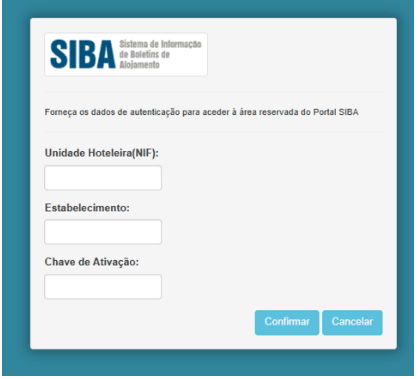
- The bulletin submission method in the SIBA portal is set to "SEF-SIBA web service integration". If another submission method is currently active (such as Página no portal), you must contact SIBA directly to request a change at https://siba.ssi.gov.pt/contactos
How to Configure the Guest Online Registration Between Holidu and SIBA
Follow these steps to connect your property to SIBA through Holidu:
- In your Holidu App, click on the Holidu Logo and go to the "Account" section. Click on the "Configure" button present in the "Online guest registration" section

- You'll see a list of your properties. Click "Configure" next to the one you want to connect
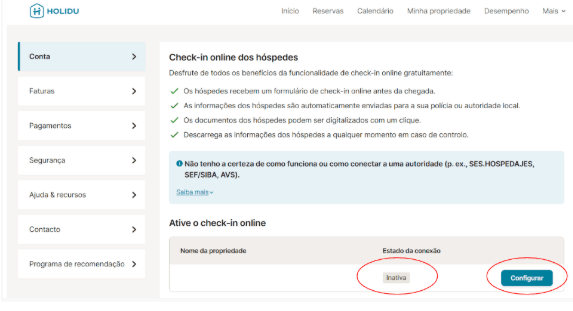
- Fill in the form with your information and credentials from the SIBA Portal and enable "Send data automatically to the responsible authority"

- Choose SIBA – SEF-SIBA web service integration, and enter the NIF (VAT number), Activation Key, and Establishment Code

- Click "Validate", and once it shows "Completed!", click "Save Changes"
- Once it's completed, you will see that the connection is active

What Happens After the Activation
After you successfully activate the SIBA connection, the guest registration process becomes automatic for future bookings. Here's what you need to know:
- Only bookings with a check-in date at least 6 days after configuration completion will automatically receive the registration form
- Your guests will be associated with a secure check-in form for each booking
- The form is automatically sent to guests by email or via message (for Airbnb bookings)
- Guest data collection and submission are now streamlined and compliant with SIBA requirements
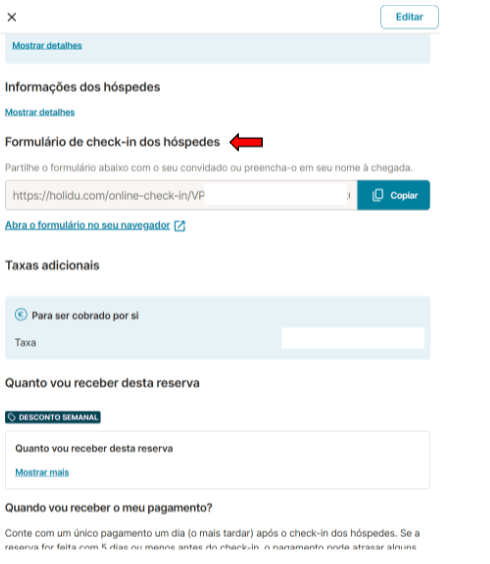
Guest's Point of View
Understanding the guest experience helps ensure smooth data collection. Here's how guests interact with the registration form:
How Guests Receive the Form
After booking, guests receive a form link via email or Airbnb message. They must fill out details for all guests, including children. Guests can complete the form manually or by scanning their ID documents.


Data Security and Reminders
Guest data is securely stored throughout the process. If guests do not complete the form:
- Automatic reminders are sent 5 days prior to the check-in date
- If the form remains incomplete by check-in day, you as the host can access the link to collect information manually
- After 11:00 PM on the check-in date, completed data is automatically sent to the SIBA portal
Form Statuses
As a host, you can monitor the status of each guest registration form directly in the booking details on your Holidu app. Understanding these statuses helps you manage compliance effectively.
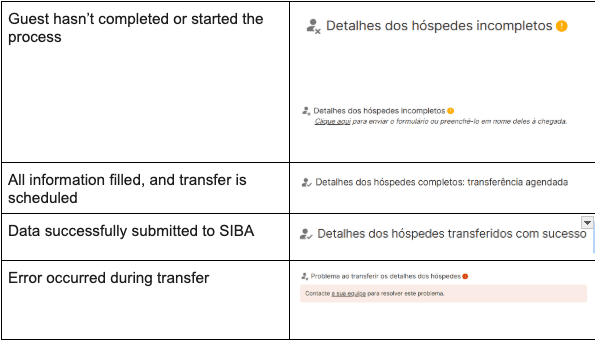
How to Fix Incomplete Data
If you encounter issues with form completion or submission:
- Resend the form link to the guest as a reminder
- For transfer errors:
- Contact Holidu Support at
- Confirm that the submission method in SIBA is set to "SEF-SIBA web service integration"
How to Get the Guest Registration Form - Boletim de Alojamento
You can download the guest registration form (Boletim de alojamento) at any time for your records or manual use:
- Log in to Holidu and go to More > Account > Guest Online Registration
- Click Configure, then open Details > Documents
- Select Generate Guest Form, choose the period, and click Download


Frequently Asked Questions
When do the guests receive the form?
Guests receive the form link immediately after booking via email or Airbnb message. If the form remains incomplete 5 days before arrival, an automatic reminder is sent to encourage completion.
What about multi-unit properties?
The feature is not yet available for properties with multiple units (such as separate rented rooms). Holidu is actively working to make this feature available for multi-unit properties soon.
What happens to bookings made before activating SIBA with Holidu, but with future check-ins?
The form will only be sent automatically if SIBA configuration was completed at least 6 days before check-in. For bookings made before this window, you must manually submit guest data to SIBA.
Do I need to register all guests, including minors?
Yes, all guests must be registered, including minors. Minors can be registered by their parents or legal guardians using the same form.
What if guests don't fill out the form?
Guests will receive an automatic reminder 5 days before the check-in day. If the form remains incomplete, you as the host can fill it out during check-in or resend the link to ensure completion before 11:00 PM on the check-in day.
Can I edit the form after submission?
No. Once submitted to SIBA, the data cannot be changed through Holidu. For corrections, contact the SIBA portal directly at https://siba.ssi.gov.pt/
Will I receive a notification when a guest completes the form?
No automatic notifications are sent. You can check the booking details manually to verify form completion status at any time.
Can I use this configuration for all bookings?
Only bookings made via connected channels on Holidu are supported. Manual bookings or iCal imports are not supported by the online guest registration feature.
What if a guest fills in their data and then cancels?
If a guest cancels their reservation after providing data, the information will not be sent to SIBA. Data transfers only occur for active reservations on the check-in day.
Do secondary accounts have access to this feature?
No. Only the main account holder can configure the feature. Collaborators can view the form in reservation details but cannot manage or activate the SIBA connection.
When is guest data transferred to the SIBA portal?
Guest data is automatically transferred to the SIBA portal after 11:00 PM on the day of check-in. Ensure all guest information is completed by that time for successful transfer.
What should I do if I have issues activating the SIBA connection with Holidu?
If you encounter any problems during activation or configuration, contact Holidu's support team at for immediate assistance.
Important Note
The Holidu guest registration feature helps automate the process of collecting and submitting guest data to SIBA. However, legal responsibility for submitting accurate and timely data lies solely with the host. For official and detailed legal information, visit: SIBA FAQs – Legal Questions
Do you want to contact us?
We’re here to help. You can contact us directly if you need assistance or have questions.
Contact us